Editing dub packs in your browser
A timeline for the part of pack-making that is otherwise a text editor and a stopwatch.
PartyDub ·
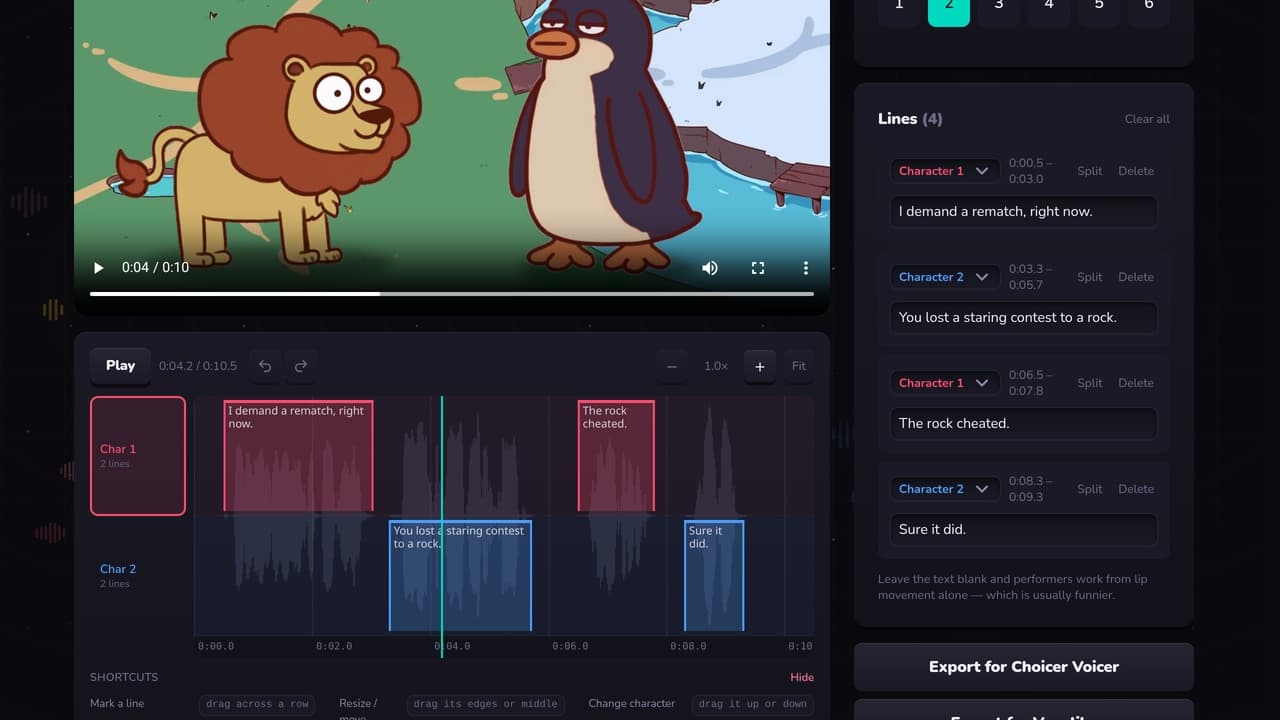
Marking who speaks when is the work. Everything else about a dub pack is file naming. PartyDub's editor is a timeline for that one job, and it reads and writes the formats both games use.
Starting from a pack you already have
Drop a pack .zip onto the editor, or point it at the folder your packs live in and pick one from the list. Its lines load with their original timings and speaker names, and you edit from there.
Packs published for Choicer Voicer carry an Ogg Theora video, and no current browser decodes Theora — Chrome dropped it in version 123 and Safari never had it. The scene is converted so you can see what you are marking. Exporting for Choicer Voicer puts the original file back untouched.
Starting from your own clip
Choose a video and mark it. Two ways, and they mix freely:
- —Tap along — play the scene and hold a number key while each character talks. A minute of this beats an hour of dragging, and it handles overlapping speakers and music better than automatic detection does.
- —Draw by hand — drag across a character's row to mark a line, drag its edges to retime, drag it up or down to change who says it.
Exporting
There is a button per game because they are not the same format. The lines and timings are identical either way; the video and a couple of pack files differ. Exporting for Choicer Voicer converts your video to Ogg Theora, which is the one step that needs a server — a pack that arrived as Theora skips it entirely.
What it costs
Nothing, and there is nothing to install. It runs on desktop and on a phone.
Make a pack without the typing
A free Choicer Voicer and Voxalike pack editor in your browser. Mark who speaks when against the waveform, then export for either game.
Open the editor